6 Best Dash Cams With Parking Mode (October 2026)
The best dash cams with parking mode include the ROVE R2-4K Dual for everyday commuters, the VIOFO A229 Plus for busy parking lots, and the REDTIGER F7NP for simpler parking needs.
On this page (8 sections)
- The best dash cams with parking mode
- Which parking recording mode should you choose?
- What should you check before hardwiring a dash cam?
- How much camera coverage do you need while parked?
- How should you set up parking mode for reliable footage?
- What memory card and care routine does parking recording need?
- Which parking-mode mistakes should you avoid?
- Which dash cam with parking mode should you choose?
The ROVE R2-4K Dual is the best dash cam with parking mode for most drivers because its three recording options suit different parking situations. Choose buffered recording instead if footage from before a bump matters more than having several modes.
Every camera here needs a compatible hardwire kit for parked monitoring. Include that kit, suitable memory, and installation in your buying plan.
Start with what dash cam parking mode does if the mode names are unfamiliar. Our best hardwire dash cams guide also helps if the power connection is your main concern.
Our picks at a glance
-
1

-
2

-
3

The best dash cams with parking mode
Choose ROVE for everyday flexibility, VIOFO for buffered front and rear footage, or a camera with extra views when activity beside or inside your car matters. Recording mode and camera placement deserve as much attention as resolution.
KeenerLook compared parking triggers, pre-event capture, camera coverage, storage, and setup needs. The product order follows the fixed scores, while the badges identify the buyer each camera serves.
| Product | Best for | Parking modes | Camera coverage | Memory card | Our score |
|---|---|---|---|---|---|
| ROVE R2-4K Dual | everyday commuters | Time-lapse, motion detection, collision detection | Front and rear | 128GB included | 9.3 |
| VIOFO A229 Plus | busy parking lots | Auto event detection, time-lapse, low bitrate | Front and rear | Not included | 8.8 |
| REDTIGER F7NP | simpler parking needs | Time-lapse and G-sensor collision detection | Front and rear | 128GB included | 8.7 |
| IIWEY N6 360 Dash Cam | curbside parking | Time-lapse and impact detection | Front, rear, and both sides | 128GB included | 8.3 |
| 70mai 4K 3-Channel Dash Cam | rideshare drivers | Parking monitoring and G-sensor collision detection | Front, interior, and rear | 64GB included | 8.1 |
| Vantrue N4 Pro S | overnight cabin monitoring | Buffered motion and impact detection | Front, interior, and rear | Not included | 8.0 |
ROVE R2-4K Dual
- Three parking recording options
- Locked event clips with startup alerts
- Front and rear recording
- 128GB microSD card included
A useful starting point for commuters who park in different places and want a choice of recording modes. Startup voice alerts flag parking events for review.
Pros
- Three parking mode options
- Locks a 1-minute event video
- 128GB card included
Cons
- Hardwire kit is not included
- Front footage is upscaled from 2.5K
ROVE: a dash cam with parking mode for everyday use
The ROVE R2-4K Dual suits commuters who alternate between a driveway, work lot, and street parking. Its 1 fps time-lapse, motion detection, and collision detection let you choose ongoing footage or event-focused recording.
ROVE says a parking event produces a locked 1-minute clip, followed by a voice alert when you next start the car. That reminder is useful if you might otherwise drive away without checking for damage.
Its front footage is captured at 2.5K and upscaled to 4K, with 1080P at the rear. Buy it for its parking options rather than expecting native 4K front capture.
The included 128GB card gets you started, and storage can expand to 1TB. A separate hardwire kit is still necessary for parked use.
Skip this model if a defined pre-event capture window is your main requirement. VIOFO is the clearer fit for front and rear footage that includes the lead-up to a detected incident.
VIOFO A229 Plus
- Buffered event detection
- Time-lapse and low-bitrate options
- 1440P front and rear HDR recording
- HK4 hardwire cable required separately
Pre-event footage helps show an approaching vehicle or person before a detected incident. Its continuous low-bitrate option also suits drivers who want a broader record.
Pros
- Saves 15 seconds before and 30 seconds after a detected event
- Three parking mode options
- Front and rear HDR recording
Cons
- HK4 hardwire cable is sold separately
- No memory card included
VIOFO: buffered parking footage for busy lots
The VIOFO A229 Plus suits drivers who want to see how an incident began. Its buffered event mode saves 15 seconds before and 30 seconds after detection, which can provide context around an approaching vehicle or person.
Time-lapse and continuous low-bitrate recording give you alternatives when event clips are too narrow for your needs. Low-bitrate recording is useful when you want a running record without keeping full-size driving files.
Both cameras record at 1440P with HDR available front and rear. Front 1440P at 60 fps cannot run with HDR enabled, so choose the setting around your lighting needs rather than selecting the highest frame rate automatically.
Budget for the HK4 hardwire cable and a memory card, as neither is included. Card support extends to 512GB.
Skip it if you need cabin footage or dedicated side views. It is the stronger choice here for drivers who prioritize parking context at both ends of the vehicle.
REDTIGER F7NP
- Time-lapse and G-sensor parking modes
- 4K front and 1080P rear recording
- Hardwire kit required
- 128GB memory card included
Choose it when time-lapse and collision-triggered clips cover your parking needs. The included card removes one item from the setup checklist.
Pros
- Time-lapse or collision-triggered recording
- Locks clips when a collision is detected
- 128GB card included
Cons
- Hardwire kit required for parking mode
- Skip it if pre-event footage is essential
REDTIGER: two parking options without extra cabin cameras
The REDTIGER F7NP suits drivers whose parking needs come down to time-lapse or collision-triggered recording. That is a useful shortlist if you want an ongoing overview or a saved clip after a detected bump.
G-sensor collision detection locks the relevant footage. Choose time-lapse when a sequence of activity matters more than normal-speed movement, such as reviewing vehicles passing through a parking area.
The camera pairs 4K front recording with a 1080P rear view and includes a 128GB card. Its front STARVIS 2 sensor and HDR/WDR features are relevant for changing light, but no camera can promise readable plates in every parked scene.
A hardwire kit is required before you can use its parked monitoring. REDTIGER also advises using original or officially recommended power accessories.
Skip this model if motion-triggered clips or a stated pre-event buffer are essential. ROVE offers a separate motion option, while VIOFO gives a defined buffered capture window.
IIWEY N6 360 Dash Cam
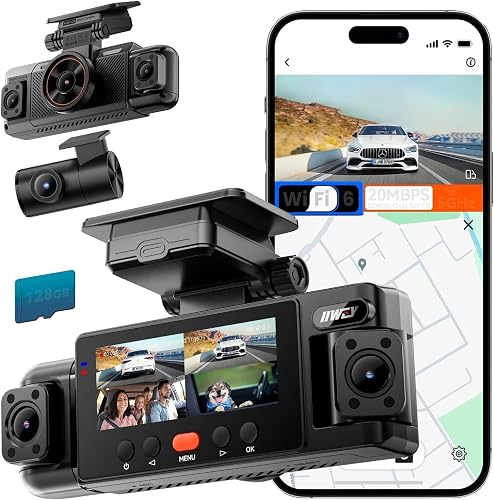
- Front, rear, and both side cameras
- Time-lapse and impact detection
- IIWEY hardwire kit required separately
- 128GB card included
Adjustable side cameras make this the pick for drivers concerned about activity beside their vehicle. Position each view carefully around pillars, seats, and window reflections.
Pros
- Four-channel coverage
- Adjustable side cameras
- 128GB card included
Cons
- Hardwire kit is sold separately
- Supports cards only up to 256GB
IIWEY: extra views beside a parked vehicle
The IIWEY N6 360 Dash Cam is the pick for drivers worried about activity alongside their car. It records four 1440P views covering the front, rear, and both sides, with adjustable side cameras.
That layout is useful for curbside parking or spaces where neighboring vehicles sit close to the doors. Check actual framing before fixing the mount, because pillars and seats can block a side camera's view.
Parking options are time-lapse at 1, 3, or 5 fps, plus impact detection that captures and locks a 10-second clip. The required IIWEY hardwire kit, B0DHJNRPB9, is sold separately.
A 128GB card is included, with support up to 256GB. Four recording channels make regular footage checks and timely incident backups especially worthwhile.
Skip it if front and rear coverage already meets your needs. The extra cameras are worth the installation attention only when their views show areas you actually want to monitor.
70mai 4K 3-Channel Dash Cam

- 4K front, 1080P interior, and 1080P rear cameras
- Switchable interior infrared recording
- Compatible UP06 or UP03 hardwire kit
- 64GB card included
A cabin camera serves drivers who need a record inside the vehicle as well as on the road. Choose it for those three views rather than remote cellular access.
Pros
- Records front, cabin, and rear views
- Switchable infrared for the interior
- 64GB card included
Cons
- Compatible hardwire kit required for continuous monitoring
- No 4G connectivity
70mai: cabin coverage for passenger trips
The 70mai 4K 3-Channel Dash Cam suits rideshare drivers and families who want a cabin view alongside road footage. It records 4K at the front and 1080P from both the interior and rear cameras.
Switchable infrared recording helps the interior camera work in a dark cabin. Aim that camera toward the area you need to document, then check that the mirror or front seats do not hide it.
Parking monitoring includes G-sensor emergency locking. Continuous monitoring needs a compatible UP06 or UP03 hardwire kit.
The included 64GB card is a starting point, and the camera supports cards up to 512GB. Plan storage around three video streams rather than judging capacity by the front camera alone.
Skip it if you want remote cellular access, as this model does not support 4G. Also choose Vantrue instead if your key requirement is a defined pre-event window with all three cameras active while parked.
Vantrue N4 Pro S

- Buffered motion and impact detection
- All three cameras remain active in parking mode
- Hardwire kit required and sold separately
- Supports up to 1TB microSD
Choose this when cabin coverage and footage from before a parking event are both priorities. All three cameras remain active during parked monitoring.
Pros
- All three cameras stay active in parking mode
- Captures 10 seconds before an event
- Supports up to 1TB microSD
Cons
- Hardwire kit is sold separately
- Memory card is not included
Vantrue: buffered parking coverage inside and out
The Vantrue N4 Pro S suits drivers who need pre-event footage and cabin coverage together. All three cameras remain active in parking mode, with buffered motion and impact detection capturing 10 seconds before an event.
Its recording layout is 4K front, 2.5K rear, and 1080P inside. The rear camera rotates, so check its final position carefully if you change between a road view and another area.
A front-and-rear recording option is available for driving when you do not need the cabin stream. Choose your channel layout deliberately rather than collecting interior footage by default.
You need a separate compatible hardwire kit and memory card. Support for cards up to 1TB gives room for longer recording history, though retention still depends on recording settings and use.
Skip it if a cabin view adds little value to your routine. VIOFO offers buffered coverage at the front and rear without adding an interior camera to your setup.
Which parking recording mode should you choose?
Choose buffered event recording for context, time-lapse for a broad overview, or continuous low-bitrate recording when you want fewer gaps between events. Impact-only recording suits drivers mainly concerned about bumps, but it can miss activity that causes no trigger.
Buffered detection shows the lead-up
A buffer preserves footage from before the camera recognizes an event. That can show an approaching vehicle, its direction, or a person's movement before the impact itself becomes visible.
Choose this when identifying what happened before contact matters. A clip that begins after a jolt may show only a vehicle leaving the frame.
Time-lapse gives an overview
Time-lapse saves frames at intervals, making it useful for reviewing a long parking stay without normal-speed files. The trade-off is less detail between frames, so quick movement can be harder to follow.
Choose it for a view of changing activity around the car. Do not expect it to replace a normal-speed clip of a fast incident.
Low-bitrate recording keeps a running record
Continuous low-bitrate recording uses smaller files while preserving an ongoing sequence. VIOFO offers this as a separate parking option, which is useful when you want coverage between detected events.
Busy scenes can create many motion clips, while light contact may not trigger an impact sensor. Choose the mode around the activity you need to capture, then review sample recordings from your own parking space.
What should you check before hardwiring a dash cam?
Confirm camera compatibility, the correct power connections, and battery protection before choosing a kit. A plug that fits the camera does not by itself establish that the kit supports its parking functions.
Check the exact camera model, kit instructions, and fuse-tap size. Vehicles use different fuse types, so do not assume one set of taps will fit every fuse box.
Many parking installations use separate constant-power and ignition-sensing connections. Follow the camera and vehicle instructions, and keep connections away from safety-critical circuits.
Read how to hardwire a dash cam before planning the job. Use a qualified installer if identifying suitable circuits or routing around airbags is beyond your experience.
Choose a kit with suitable low-voltage protection rather than assuming every cable includes it. Where a timer is available, it can also limit how long the camera draws power after parking.
A cutoff protects the battery reserve by stopping recording; it does not provide more energy. An older battery, cold weather, long parking stays, and short drives can all reduce the power available.
Treat “24/7” as a description of the monitoring feature, not a promise that the camera will record indefinitely. If your car often sits unused for days, plan around that limit before making parking recording your main security measure.
How much camera coverage do you need while parked?
Choose front and rear cameras first, then add side or cabin views only when they cover a real concern. More channels help only if their lenses can see the relevant area.
Front and rear coverage suits drivers mainly concerned about vehicles approaching from either end. It cannot reliably show every door strike or activity beside the middle of the car.
Side views make more sense when close neighboring spaces or curbside activity are your main concern. Even then, bodywork, pillars, glass reflections, and nearby vehicles can hide the point of contact.
A cabin view serves a different purpose from an exterior side camera. It can document the passenger area, but pointing through the cabin toward a window does not guarantee a clear view outside.
See whether you need a rear dash cam if you are still deciding between one and multiple cameras. Check each proposed angle from the camera's actual mounting position before committing to the layout.
Garage lighting and window tint also affect the view. A well-placed camera with clean glass can be more useful than an extra camera aimed through a heavily obstructed window.
How should you set up parking mode for reliable footage?
Set up the camera, power, and storage together, then confirm that parked files are actually being saved. A camera that records correctly during a drive may still need parking mode enabled or its power connection corrected.
- Choose the view before attaching the mount. Keep the camera clear of the driver's sightline and aim it through a useful part of the glass.
- Inspect every lens. Remove protective film, clean fingerprints, and check the rear camera's orientation.
- Route cables safely. Keep them clear of pedals, moving trim, and airbag deployment paths.
- Configure storage. Use a compatible card, save anything needed from it, and format it as directed by the camera maker.
- Set the clock and parking mode. Accurate date and time make it easier to find a clip and explain when an incident occurred.
- Review saved files after parking. Confirm the expected mode, camera views, and transition back to driving recording.
Our dash cam installation guide covers mounting and cable routing in more detail. Check hatchback cable slack with the rear door fully open and closed before securing the final route.
Start with the recommended motion and impact sensitivity, then adjust based on saved clips. Excessive sensitivity can create needless events, while a low setting may miss minor contact.
Do not strike the vehicle to check impact detection. Confirm the mode through its status indicators and saved parking files, following the camera's instructions.
Download and play a clip from each camera while parked safely. Confirm that the footage shows what you intended, rather than relying only on a small live preview.
What memory card and care routine does parking recording need?
Use a compatible high-endurance card and check recordings regularly. Parking mode adds writing time beyond your daily drive, so card suitability matters as much as capacity.
Our guide to choosing a dash cam SD card explains endurance and compatibility. Match the card to the exact camera's capacity and speed requirements rather than buying solely by size.
Larger cards generally keep more history before loop recording replaces older files. The actual retention time depends on channel count, resolution, recording mode, and how much footage is protected.
A locked clip still needs a backup if it matters. After finding damage, save the relevant files promptly and keep the original video rather than relying only on a screenshot.
Check a recent driving clip and parking clip at regular intervals. An error message, missing channel, incorrect timestamp, or repeated gap is a reason to investigate before depending on the system.
Clean the glass inside and out, especially around the rear lens. Recheck camera angles after windshield work, moving the mount, cleaning the cabin, or carrying a load that could disturb a cable.
Keep firmware and app software current using the brand's instructions. Download needed footage before formatting a card or making changes that could affect saved files.
Which parking-mode mistakes should you avoid?
Avoid assuming that power, Wi-Fi, or a wide-angle lens guarantees complete protection. Each solves a different part of the recording job.
An included car charger can power ordinary driving recording, but an accessory socket may turn off with the ignition. Confirm parked power rather than treating a lit screen during a drive as proof.
A supercapacitor is not an overnight power supply. These cameras still need an external power source for parked recording.
Local Wi-Fi also does not establish remote access from home or work. Phone downloading near the car is different from cellular alerts or watching a vehicle from another location.
Wide-angle coverage does not remove blind spots. Check parked footage for blocked areas, reflections, and distant detail before deciding the camera can document a particular parking space.
Do not chase maximum sensitivity without reviewing the results. A folder full of unnecessary clips makes useful events harder to find and may consume storage you need.
Finally, do not leave incident recovery until later. Note the approximate time, save nearby clips from all relevant channels, and keep copies before ordinary recording replaces the history.
Which dash cam with parking mode should you choose?
Choose ROVE for flexible daily use, or VIOFO when buffered front and rear footage is the priority. Pick REDTIGER if time-lapse and collision clips cover your needs without adding cabin cameras.
Choose IIWEY for useful side views, 70mai for road and passenger-area recording, or Vantrue when buffered parking footage must also include the cabin. Skip extra channels that do not show an area you need.
Before buying a dash cam with parking mode, settle three things: the view, the recording mode, and the power plan. Then check card requirements and installation needs so the camera is ready for parked use.
For a broader equipment checklist, read how to choose a dash cam. Revisit what parking mode does to choose your recording approach, then use how to hardwire a dash cam to plan the power connection.
Our top 3 picks at a glance
-
1
-
2
-
3
Frequently asked questions
Does parking mode need a hardwire kit?
Every camera here needs a compatible hardwire kit for parked monitoring. VIOFO A229 Plus uses HK4, while the 70mai model supports UP06 or UP03.
Buy the kit for the exact camera model, then confirm its fuse connections and battery protection settings suit your vehicle before arranging installation.
What is buffered parking mode?
Buffered parking mode saves video from before a detected event, giving you more context than footage that starts afterward. VIOFO A229 Plus saves 15 seconds before and 30 seconds after detection; Vantrue N4 Pro S captures 10 seconds before an event.
A buffer still depends on available power and a usable camera view.
Can a dash cam drain a car battery in parking mode?
Yes, parked recording uses vehicle battery power and can leave too little charge for starting. Use a compatible kit with suitable low-voltage protection, and follow its instructions.
Battery age, temperature, parking duration, and driving habits affect the available reserve.
Our guide to dash cams and car battery drain explains the main checks.
Will parking mode record when the car is off?
Yes, these cameras can record with the ignition off when parking mode is configured and a compatible hardwire kit supplies power. An ordinary accessory socket may switch off with the vehicle.
Recording can stop when battery protection cuts power, so a parking mode feature does not promise uninterrupted recording throughout every stay.


