Best 360 Dash Cams: Top 6 Picks (October 2026)
The best 360 dash cams include the IIWEY N6 360 Dash Cam for daily commuters, the ZMOPO 360 4-Channel Dash Cam for video-only drivers, and the PRUVEEO 360 4-Channel Dash Cam for route documentation.
On this page (8 sections)
- Which 360 dash cams suit different drivers?
- How did we compare these 360 dash cams?
- What changes between these 360 dash cams?
- What should you check before buying a 360 dash cam?
- How should you install and check a multi-camera system?
- How do you keep a 360 dash cam recording reliably?
- Which mistakes make a 360 dash cam less useful?
- Which 360 dash cam should you choose?
The IIWEY N6 360 Dash Cam is the best 360 dash cam for most drivers here because it combines higher-resolution coverage in four directions with built-in GPS. Choose the IIWEY N9 when a separate cabin view matters more than extra detail in each road view.
A multi-camera system makes sense for side incidents, passenger disputes and situations that a forward-facing lens can miss. Its value depends on what each camera can actually see through your vehicle's windows.
For a simpler setup, compare our best front and rear dash cams. If forward road detail is your main concern, start with the best 4K dash cams.
Our picks at a glance
-
1
-
2

-
3

Which 360 dash cams suit different drivers?
The N6 suits most commuters, while the N9 is the stronger match for drivers who need a dedicated passenger view. The remaining picks offer specific reasons to choose them, including adjustable lenses, screen-based framing and spoken controls.
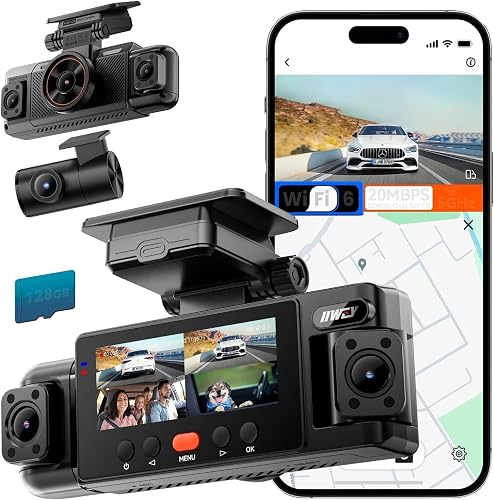
IIWEY N6: the 360 dash cam for daily commuting
IIWEY N6 360 Dash Cam
- 4-channel recording
- 2K front, rear and side recording
- Built-in GPS
- 128GB card included
Choose the N6 for road and side coverage with higher resolution across all four views. GPS is built in, while parked recording needs a separate hardwire kit.
Pros
- 2K recording across four views
- Adjustable side cameras
- Built-in GPS
Cons
- Parking mode requires a separate hardwire kit
- No separate fifth cabin view
Choose the N6 if you want detail across the whole camera system rather than a high-resolution front camera paired with lower-resolution side views. It records four simultaneous 2K views, with adjustable side cameras to help you frame the areas beside your vehicle.
Its built-in GPS records speed and route information for playback in the phone app or PC viewer. Wi-Fi 6 handles local previews and downloads, which is useful when you need to save a clip before leaving the car.
For parking use, IIWEY offers time-lapse and impact detection through its separate N6-compatible hardwire kit. IIWEY describes time-lapse recording of up to about 48 hours, but actual parked recording depends on available power and the chosen setup.
The N6 is the most balanced choice here for a driver who wants road coverage, side context and route records. Skip it if you need a dedicated fifth cabin view or mainly want a smaller two-camera installation.
A front and rear dash cam is worth considering if side recording would add little to your usual driving.
ZMOPO: for drivers who don't need route logs
ZMOPO 360 4-Channel Dash Cam
- Four 1080p cameras
- 5GHz Wi-Fi
- 128GB card included
- Optional GPS logger
The ZMOPO suits drivers who want four views without needing route logs. A separate GPS logger can add location and speed records later.
Pros
- Adjustable front cameras
- 128GB V30 card included
- Supercapacitor
Cons
- GPS logger sold separately
- Parking mode needs a separate hardwire kit
Choose the ZMOPO if your priority is recording events from several directions and you don't need GPS at the start. Its four 1080p cameras record simultaneously, and the adjustable front cameras let you change the balance between side and interior coverage.
GPS requires a separate logger, so leave that accessory out if you only want video. If route documentation is already on your must-have list, compare a camera with GPS included before choosing this setup.
The system uses a supercapacitor and requires external power during operation. ZMOPO includes a V30 memory card and warns against generic Class 10 replacements for its four-channel recording.
Its optional ACC hardwire kit enables parking mode, including time-lapse that compresses 60 minutes into 1 minute. That condensed view helps show activity over time, but it serves a different purpose from normal-speed incident footage.
Skip this model if you expect remote phone access while away from the vehicle. Its Wi-Fi is for nearby viewing and sharing, and ZMOPO explicitly excludes remote surveillance.
PRUVEEO: for route records and flexible camera angles
PRUVEEO 360 4-Channel Dash Cam
- Four 1080p cameras
- Built-in GPS
- 128GB card included
- Adjustable front lenses
PRUVEEO combines included GPS with three adjustable front lenses. It suits drivers who want route context and flexibility when aiming their cameras.
Pros
- Built-in GPS
- Adjustable front lenses
- Adhesive and suction mounting options
Cons
- Parking mode requires a separate kit
- All four cameras record at 1080p
The PRUVEEO suits drivers who want GPS included and room to adjust how the front-mounted lenses divide their coverage. Its front 3 lenses can be aimed separately, which helps when a mirror, pillar or seating position affects the view.
All 4 channels record at 1080p. Choose it for coverage flexibility and location context; choose the N6 instead if higher resolution across those views is your main priority.
PRUVEEO includes adhesive and suction mounting options. That gives you a choice of mounting method, though you should still follow the mount instructions and check that the camera stays secure.
The camera has no built-in battery and needs external power while recording. Its separate ACC hardwire kit is required for parking mode, so a driving-only installation does not provide automatic overnight coverage.
This is a sensible fit if your vehicle needs careful lens aiming and you want route information without an extra logger. Skip it if you want to crop deeply into distant road details or prefer a dedicated cabin channel alongside all exterior views.
IIWEY N5: for checking framing on the camera
IIWEY N5 4-Channel Dash Cam
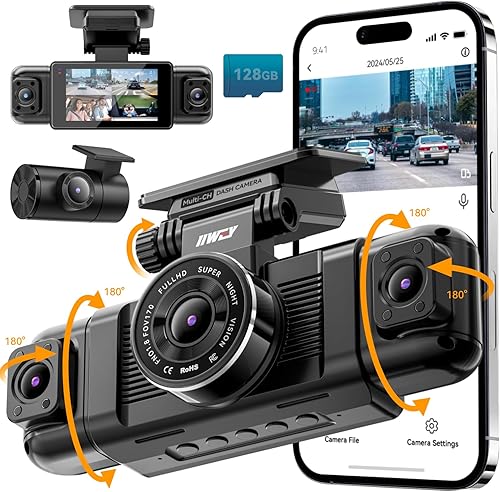
- Four-channel recording
- 3 in IPS screen
- 128GB card included
- No GPS
The N5 suits drivers who want to check framing on an onboard screen and don't need route logs. Use its original car charger or a compatible hardwire kit.
Pros
- 3 in IPS screen
- 128GB card included
- 2.5K front recording option
Cons
- No GPS
- Cannot run from an ordinary USB or Type-C cable
The N5 suits drivers who prefer to check angles and settings on an onboard 3 in IPS screen. You can confirm the camera's view without first connecting a phone, then use the app when you need to preview or download files.
It offers four-channel 1080p recording and a mode with a 2.5K front view alongside the other channels. There is no GPS, so choose another model if speed and route records are part of your reason for buying.
Power compatibility deserves attention before installation. The N5 requires its original cigarette lighter charger or compatible hardwire kit; an ordinary USB or Type-C cable cannot power it.
Its rear camera also needs a wired connection to the front unit. Plan that cable run before deciding where to attach either camera, especially in a hatchback or long vehicle.
For phone access, hold the left-arrow button to enable Wi-Fi before connecting. The N5 turns Wi-Fi off after more than 5 minutes without an app connection, so reconnecting may require enabling it again.
Skip it if you want GPS included or expect to use an existing USB power cable.
Neideso N300: for spoken commands and mode choices
Neideso N300 360 Dash Cam

- Four-channel recording
- English voice control
- Built-in GPS
- 128GB card included
The N300 suits drivers who want English voice commands and a choice of recording layouts. Its 4K modes use fewer channels than its four-view mode.
Pros
- English voice control
- Built-in GPS
- Selectable recording modes
Cons
- Parking mode needs a separate accessory
- 4K modes use only two or three channels
Choose the N300 if English voice commands would help you use common controls without reaching for the camera. Supported commands include taking a photo and switching audio, Wi-Fi or the screen on and off.
Its recording modes require a clear choice between resolution and channel count. You can select 4K plus 1 or 2 additional 1080p views, while recording all 4 channels uses one 2K view and three 1080p views.
That flexibility suits a driver who might change coverage priorities. Skip it if you expect four-channel recording with a 4K front view at the same time.
Neideso recommends an initial firmware update through the Tscam app and formatting the preinstalled card before use. Allow time for those steps while parked, with the camera connected to its original vehicle charger.
Parking operation requires a compatible separate power or radar accessory, and the accessory choice affects recording behavior. Confirm the exact N300 combination before planning an overnight setup.
The N300 includes GPS and local app access, but it does not include cloud storage or remote monitoring.
IIWEY N9: for keeping passenger coverage separate
IIWEY N9 5-Channel Dash Cam

- Five-channel recording
- Front, rear, left, right and cabin views
- 12 IR LEDs
- 128GB card included
The N9 gives the cabin its own view alongside front, rear and side recording. Choose it when passenger coverage matters more than higher resolution per channel.
Pros
- Separate cabin view
- 12 IR LEDs
- Built-in GPS
Cons
- Parking mode needs a separate kit
- Requires its original car charger, compatible hardwire kit or compatible OBD cable
Choose the N9 when you want front, rear, left, right and cabin views without assigning a side-facing lens to passenger recording. That separate cabin channel makes it the clearest fit here for rideshare work or family trips where interior context matters.
All 5 views record at 1080p. Its 12 infrared LEDs support recording in darkness, but windows, headrests and passengers can still block parts of the scene.
Built-in GPS adds speed, coordinates and route records. The included high-endurance card supports loop recording, and the G-sensor protects collision clips from normal overwriting.
Power it with the original car charger, compatible hardwire kit or compatible OBD cable. A USB-C to USB-C cable will not work, and parking mode specifically requires the compatible IIWEY hardwire kit.
Skip the N9 if you rarely need cabin footage and would rather prioritize higher-resolution road views. For commercial use, plan who can access passenger recordings and how long you need to retain them before putting the system into daily service.
How did we compare these 360 dash cams?
We prioritized useful camera coverage, simultaneous recording modes and power requirements over the largest channel count. GPS, storage, controls and parking accessories help separate cameras that otherwise look similar.
The N6 leads because its higher resolution extends across four views. The N9 serves a more specific need: keeping cabin recording separate from road and side coverage.
We also considered the work each setup asks of the driver. Extra lenses are worthwhile when they capture a needed view, but they add files to manage and angles to check.
What changes between these 360 dash cams?
The main choices are resolution versus coverage, included versus optional GPS, and how you want to control the camera. Read the recording mode as a complete combination rather than choosing by the largest resolution number.
| Product | Best for | Channels | Resolution | Parking mode | Our score |
|---|---|---|---|---|---|
| IIWEY N6 360 Dash Cam | daily commuters | 4 | 2K front, rear and sides | Time-lapse and impact detection with separate hardwire kit | 8.3 |
| ZMOPO 360 4-Channel Dash Cam | video-only drivers | 4 | 1080p on all cameras | Time-lapse with optional hardwire kit | 7.9 |
| PRUVEEO 360 4-Channel Dash Cam | route documentation | 4 | 1080p on all cameras | Time-lapse with separate hardwire kit | 7.6 |
| IIWEY N5 4-Channel Dash Cam | phone-free framing | 4 | 1080p on all cameras, with 2.5K front mode | Time-lapse and impact detection with separate hardwire kit | 7.5 |
| Neideso N300 360 Dash Cam | spoken controls | 4 | 4K + 1080p, 4K + two 1080p views, or 2K + three 1080p views | Requires a separate compatible hardwire kit or radar sensor | 7.2 |
| IIWEY N9 5-Channel Dash Cam | rideshare drivers | 5 | 1080p across five views | Time-lapse and impact detection with separate hardwire kit | 7.0 |
The N300 shows why that distinction matters: selecting its highest-resolution mode changes how many channels record. A mode that suits forward road detail may not be the mode you want for side coverage.
Parked recording adds another decision because every camera here needs a separate compatible accessory. Compare dash cams with parking mode and review how to hardwire a dash cam before planning that installation.
What should you check before buying a 360 dash cam?
Start with the views you need and the windows they must look through. Then choose resolution, controls and parking features around that coverage plan.
Does the camera layout match your vehicle?
A wide lens cannot see through a roof pillar, seat or solid body panel. A side-facing camera inside the windshield may capture activity through side windows without showing the full lower side of the vehicle.
Map the likely incidents you want to record: traffic ahead, a rear impact, a vehicle alongside you or activity inside the cabin. Check each planned lens position against those needs before attaching a mount.
Trucks, vans and vehicles with enclosed cargo areas need particular care because the view through the cabin may end at a bulkhead. Confirm rear-camera cable reach and placement rather than assuming a passenger-car layout will suit.
If your main concern is traffic ahead and behind, front and rear versus front-only dash cams can help you decide how much coverage you need.
Will more pixels solve your recording problem?
Higher resolution gives you more pixels to work with when viewing or cropping footage. It cannot remove glare, motion blur, dirty glass or an object blocking the lens.
For a side incident, seeing the vehicle approach may be more useful than having extra detail only in the forward view. For identifying a distant object ahead, front-camera detail may deserve more weight.
Don't assume any resolution guarantees a readable plate at night or at speed. Distance, angle and lighting still affect the result, so judge the saved footage at normal playback size as well as when enlarged.
Will you use GPS or Wi-Fi?
GPS adds location context; Wi-Fi moves files locally. Neither feature, by itself, means you can watch your parked car from another location.
GPS is useful when you want to match a clip to a route or establish where an event occurred. It records the camera's location information rather than providing a remote vehicle-recovery service.
Wi-Fi helps when you need a clip on your phone without removing the card. Learn the connection steps before you need them, and download files only when safely parked.
What does parking mode actually save?
Time-lapse shows activity over time, while impact-triggered recording responds to a detected event. Those are different tools, and neither guarantees that every incident will be captured in full.
Time-lapse can leave gaps between recorded moments. Impact detection may miss an event that creates too little vibration, and you should not assume a camera saves footage from before a trigger unless that function is confirmed.
Read what dash cam parking mode does to choose the behavior you need. A camera advertised for long parking periods still depends on a suitable power supply.
How should you install and check a multi-camera system?
Confirm all camera views before fixing mounts and hiding cables. A temporary layout lets you spot blocked angles, short cables and power problems while changes are still easy.
Plan the mounts and cable paths first
Clean the mounting glass and position the main unit where it preserves your view of the road. Check that a mirror or windshield sensor housing does not block its lenses.
Allow room to operate buttons and remove the memory card. A neat position is less useful if you must disturb the mount every time you need a file.
Route cables clear of pedals, steering parts and airbag deployment paths. Leave enough slack for a rear hatch to open fully, without allowing loose cable to hang or get pinched.
Use the vehicle's instructions when working near trim and airbags. For the wider installation workflow, keep our dash cam setup guide alongside the camera manual.
Check saved clips from every channel
Remove lens protection, set the date and time, and follow the camera's card-formatting instructions. Then save a short stationary recording and open the files from each channel.
Look for a level horizon, clear road coverage and excessive dashboard reflections. Check that side views show the intended windows rather than mostly trim or seats.
For the N6, protective film can leave visible markings in footage, and enabled reversing assistance can add red guidelines. Remove the film and disable those guidelines if you don't need that feature.
After an initial drive, review daylight and low-light clips while parked. Adjust one camera angle at a time so you can see what each change improves.
Set up cabin recording with privacy in mind
Decide whether you need cabin audio as well as video before carrying passengers. Audio can capture private conversations even when the reason for buying was road coverage.
Check the rules that apply to your location and any driving service you use. Explain recording where required, restrict access to saved files and avoid sharing clips that expose passengers unnecessarily.
How do you keep a 360 dash cam recording reliably?
Check storage, power and camera angles regularly. A working screen does not confirm that every channel is saving usable video.
Use suitable storage and protect important clips
Every camera here includes a 128GB card, but storage duration varies with the selected modes and number of channels. Avoid assuming that the same capacity provides the same recording history in every system.
Choose replacement cards that meet the exact model's requirements for sustained recording. Our guide to dash cam SD cards explains capacity, speed and endurance choices.
Loop recording overwrites older unprotected files. After an incident, save the relevant footage promptly, including nearby clips and other camera angles that show the lead-up.
Keep an original copy before trimming or sharing a video. Confirm the copied files open correctly before formatting the card or returning it to normal use.
Watch the vehicle's power behavior
Check whether your accessory socket switches off with the ignition or remains live. That affects both automatic recording and the risk of leaving the camera drawing power after parking.
For a hardwired setup, confirm the power accessory's low-voltage shutdown and time settings. Don't assume every compatible kit provides the same battery protection.
Read whether a dash cam drains a car battery if you park for long periods or take mostly short trips. Recheck the setup after battery work or changes to the camera's power connection.
Keep the optical path clear
Clean the lens gently and keep the glass in front of each camera clear. Fingerprints, haze and window tint can affect the picture even when the camera settings are correct.
Check mounts after very hot weather, rough roads or moving seats and luggage. A small change in angle can replace a useful side view with a pillar or headrest.
Review a saved clip after changing recording modes or installing firmware. Confirm that all intended channels still record and that the date, time and audio settings match your preferences.
Which mistakes make a 360 dash cam less useful?
The biggest mistakes are expecting perfect coverage and leaving footage management until an incident. Avoid these habits when choosing and using the system:
- Buying by the word “360” alone. Check lens positions and actual sightlines; multiple cameras do not create an unobstructed view of every surface.
- Assuming Wi-Fi means wireless power. These cameras need vehicle power, and rear-camera connections still require installation planning.
- Choosing a headline resolution without its channel mode. Confirm which views record together at the selected setting.
- Treating parking mode as ready out of the box. Match the separate accessory to the exact camera and the recording behavior you need.
- Relying only on automatic incident locks. Save useful footage yourself when needed, since not every event creates a strong impact.
- Leaving saved clips unchecked. Open files from every camera periodically, including the rear view.
- Using the app while driving. Learn the controls while parked and stop safely before reviewing or transferring footage.
Which 360 dash cam should you choose?
Choose your 360 dash cam by the view you cannot afford to miss. Then decide how much recording detail and setup work that view deserves.
Pick the IIWEY N6 for higher-resolution coverage across four directions. Choose the IIWEY N9 when a separate cabin channel is central to rideshare work or family travel.
Choose the PRUVEEO for route records and adjustable lenses, or the ZMOPO if video is enough and GPS can remain optional. Pick the IIWEY N5 for screen-based framing without GPS, and the Neideso N300 for spoken controls and selectable channel modes.
Before ordering, sketch the camera positions and decide whether you need parking recording. Our guide to how to choose a dash cam can help you turn those needs into a final shortlist.
About this guide
KeenerLook compared these 360 dash cams by camera layout, simultaneous recording modes, controls, storage and power requirements.
Our top 3 picks at a glance
-
1
-
2
-
3
Frequently asked questions
What does a 360 dash cam record?
A 360 dash cam records several directions through multiple camera views; these models cover the front, rear and sides, with the N9 adding a separate cabin view. Camera placement, window pillars and passengers can still block parts of the scene, so check saved footage from every channel after installation.
Does a 360 dash cam need to be hardwired?
Hardwiring is not required for driving footage when you use the included car charger; parking recording needs a compatible, separately sold power accessory. Match that accessory to the exact camera model, then check its shutdown protection and installation requirements before leaving the camera powered with the engine off.
Is built-in GPS necessary in a 360 dash cam?
GPS is optional for recording video, but it adds speed and route context during playback; choose it if documenting where an incident happened matters to you. The ZMOPO needs a separate GPS logger, while the IIWEY N5 has no GPS; the other four cameras here include it.
What should I check before installing a 360 dash cam?
Check camera sightlines, cable reach, power connections and memory card instructions before securing any mounts; include the rear hatch's movement in your cable plan, and keep wires clear of airbags. Our dash cam installation guide explains mounting and cable planning so you can place each part before fixing it in place.



