6 Best Dash Cams for Trucks (October 2026)
The best dash cams for trucks include the ROVE R2-4K Dual for daily truck driving, the REDTIGER F7NP for busy highway commutes, and the Affver 4K+2.5K Dash Cam for frequent tailgate traffic.
On this page (14 sections)
- Which is the best dash cam for trucks?
- How we chose these truck dash cams
- Truck dash cams compared
- 1. ROVE R2-4K Dual
- 2. REDTIGER F7NP
- 3. Affver 4K+2.5K Dash Cam
- 4. REDTIGER F17 3-Channel
- 5. Aputeta 4K+4K Dual Dash Cam
- 6. Pemacom Truck Dash Cam
- What coverage does your truck actually need?
- What matters when fitting a dash cam in a truck?
- How should you manage footage on long truck journeys?
- What setup and care mistakes should truck owners avoid?
- Which truck dash cam should you choose?
The ROVE R2-4K Dual is the best dash cam for trucks for most daily drivers because it balances road coverage, footage access and parking options. Choose the REDTIGER F17 if you need cabin footage, or Aputeta if rear recording resolution leads your shortlist.
Start with your truck's layout before comparing resolution. A rear camera behind a toolbox, dark glass or a trailer may capture far less than you expect, regardless of its pixel count.
These picks suit cab-mounted recording setups. Don't assume any of them can serve as an exposed trailer camera or a dedicated reversing system.
Which is the best dash cam for trucks?
The ROVE R2-4K Dual is the strongest all-around pick here, while the other cameras address narrower needs such as cabin coverage or greater rear detail. Choose the camera arrangement first, then check installation and parking power.
Our picks at a glance
-
1

-
2

-
3

For more two-camera options, see our front and rear dash cam guide. Our 4K dash cam guide helps if front resolution is your main priority.
How we chose these truck dash cams
We compared coverage, storage, recording modes and installation needs against common truck layouts. A useful camera must fit the cab and make important footage easy to save.
A pickup used for commuting needs different coverage from a work truck carrying passengers. We also distinguish socket-powered driving recording from parking recording, which needs power when the truck is off.
Resolution matters, but it doesn't settle the whole decision. Rear-window obstructions, cable reach and the ability to retrieve a clip can matter more than moving up one resolution level.
Truck dash cams compared
Use coverage and parking power to narrow this table before comparing storage. A feature only helps if your truck can support the installation it needs.
| Product | Best for | Recording | Storage | Parking mode | Our score |
|---|---|---|---|---|---|
| ROVE R2-4K Dual | daily truck driving | 2.5K front upscaled to 4K, 1080P rear | 128GB card included; supports up to 1TB | Time-lapse, motion detection and collision detection; separate hardwire kit required | 9.3 |
| REDTIGER F7NP | busy highway commutes | 4K front, 1080P rear | 128GB card included; supports up to 512GB | Time-lapse and collision detection; separate hardwire kit required | 8.7 |
| Affver 4K+2.5K Dash Cam | frequent tailgate traffic | 4K front, 2.5K rear on upgraded version | 64GB card included; supports up to 256GB | 24-hour parking feature; confirm compatible power setup | 8.0 |
| REDTIGER F17 3-Channel | passenger-carrying work trucks | Three-camera coverage; 4K front and 1080P rear available with interior camera off | 64GB card included | Time-lapse and collision detection; separate hardwire kit required | 7.9 |
| Aputeta 4K+4K Dual Dash Cam | rear-focused road recording | 3840 x 2160 front and rear | 128GB card included; supports up to 512GB | Time-lapse and collision recording; separate hardwire kit required | 7.8 |
| Pemacom Truck Dash Cam | pickup-first installation planning | 4K front, 2K rear | 64GB card included; supports up to 256GB | Separate hardwire kit required; Pemacom advertises up to 72 hours | 6.6 |
Treat included card capacity as a starting point. Daily driving hours and the number of active cameras affect how quickly recordings cycle out of storage.
1. ROVE R2-4K Dual
The ROVE R2-4K Dual suits drivers who want one balanced setup for commuting, road trips and parked monitoring. Its main trade-off is front resolution: it records at 2.5K and upscales the result to 4K.
ROVE R2-4K Dual
- Upscaled 4K front and 1080P rear recording
- GPS route and speed data
- 128GB card included
- Three parking modes with optional hardwire kit
The most balanced choice here for daily truck use, with two road-facing cameras and several ways to record while parked. Choose another model if native 4K front recording is essential.
Pros
- Three parking recording options
- 128GB card included and support up to 1TB
- GPS and phone access
Cons
- Front video is upscaled from 2.5K
- Parking recording needs a separate hardwire kit
The Sony STARVIS 2 IMX675 front sensor and HDR make it a sensible shortlist choice for routes that include dawn, dusk and tunnels. Don't expect any dash cam to make every moving plate readable through glare or dirty glass.
Its included rear cable measures 6 m, so compare that with a routed path through your cab. Measuring straight from windshield to rear window leaves out bends, trim and the slack needed at each connector.
ROVE's parking options include time-lapse, motion detection and collision detection. That choice is useful if you want to select between a broad record of parked activity and event-focused recording.
A separate hardwire kit is required for those modes. Our dash cams with parking mode guide explains the differences before you plan the electrical work.
Buy the ROVE for flexible everyday use and room to expand storage. Skip it if native 4K front capture is a firm requirement, or if an interior camera is central to your work.
2. REDTIGER F7NP
The REDTIGER F7NP is a good fit for highway commuters who prioritize front-road recording and want a rear view for context. Its 170° front angle covers a wide scene, while the rear camera records at 1080P.
REDTIGER F7NP
- 4K front and 1080P rear recording
- 170° front and 140° rear views
- 128GB card included
- STARVIS 2 sensor and GPS
A good fit for drivers who prioritize the road ahead and want a rear view for added context. Its wide front angle suits coverage across lanes, while rear recording stays at Full HD.
Pros
- Wide front view
- Supercapacitor
- GPS and app-based clip downloads
Cons
- Rear recording is limited to 1080P
- Parking recording needs a separate hardwire kit
A wider view can include activity across neighboring lanes, but it spreads the scene across the frame. That makes camera aim important: fill the image with useful road area instead of dashboard or sky.
The included 21.3 ft rear cable gives you a clear installation limit to measure against. In a pickup, plan around sliding rear glass and leave connections where they won't be pulled during normal use.
The F7NP includes GPS and phone access for retrieving clips without moving the card to a computer. Learn how to save both camera views before an incident makes that task urgent.
Its supercapacitor is a useful design feature, but it doesn't remove the need for sensible heat care. REDTIGER advises disconnecting power and allowing the camera to cool if it overheats.
Choose the F7NP when front coverage takes priority over rear detail. Skip it if you want to inspect distant traffic behind the truck at a higher rear resolution.
3. Affver 4K+2.5K Dash Cam
The Affver 4K+2.5K Dash Cam suits drivers who spend time in dense traffic and want more detail behind the tailgate. The upgraded version pairs 4K front recording with a 2.5K rear camera.
Affver 4K+2.5K Dash Cam
- 4K front and 2.5K rear recording
- 64GB card included
- GPS and WiFi 6
- 3.59-inch IPS screen
A useful middle choice for drivers who want more rear resolution without choosing dual 4K recording. Confirm that you receive the upgraded version and plan storage around your driving hours.
Pros
- Higher rear resolution than the 1080P options
- Large screen for menu access
- Charger includes an extra USB port
Cons
- 64GB included card
- Parking power requirements need confirmation
Affver changed the rear camera and WiFi hardware in June 2026. Confirm that you're ordering the upgraded version, since those changes are part of the reason to choose it.
The 3.59-inch IPS screen gives you space for menus and checking camera framing. Position the unit where it remains accessible while parked without taking up needed windshield space.
Its charger includes an extra USB port, which helps when the camera would otherwise occupy your only convenient charging point. Plan the phone cable too, so neither lead hangs across the shifter or controls.
Affver includes a smaller card than the ROVE, F7NP and Aputeta. Drivers who spend long days on the road should plan how often they'll save clips and whether they need a compatible larger card.
Choose it for the balance between rear resolution and a large local screen. Skip it if parking coverage is your main reason for buying until you've confirmed the compatible power setup and recording behavior.
4. REDTIGER F17 3-Channel
The REDTIGER F17 3-Channel is the choice for work trucks where passenger or cabin activity matters. Its interior camera adds a view that a normal front-and-rear pair cannot provide.
REDTIGER F17 3-Channel
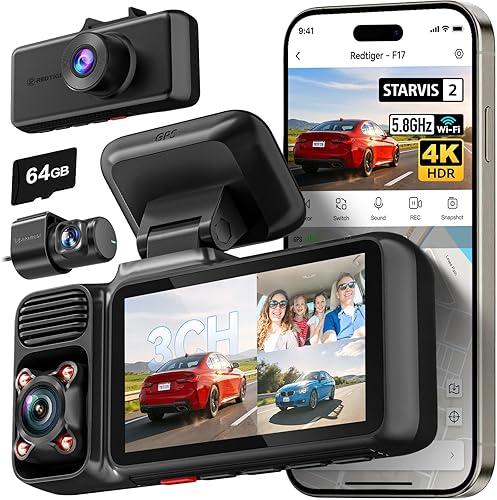
- Front, interior and rear cameras
- 4K front and 1080P rear with interior camera off
- 64GB card included
- GPS and dual-band WiFi
Choose the F17 when events inside the cab matter as much as road traffic. Check the active recording mode because adding the interior view changes the available front resolution.
Pros
- Adds cabin footage to road coverage
- Supercapacitor
- App supports three-channel playback
Cons
- 4K front mode requires the interior camera to be off
- Parking recording needs a separate hardwire kit
The key decision is the recording mode. 4K front and 1080P rear recording require the interior camera to be off, so don't buy it expecting that front setting while all 3 views are active.
Confirm the resolution available in the three-camera mode you intend to use. Then check the saved files from every channel rather than relying only on the front-camera preview.
Aim the cabin view toward the seats or interior area you need documented. A camera facing passengers won't necessarily show equipment tucked behind a seat or beneath a cover.
The app supports playback of the 3 channels, which helps you review the same event from different views. Extra footage also means more files to manage and save after an incident.
Choose the F17 when cabin context earns its place in your setup. Skip it for solo commuting if road coverage is all you need, since a two-camera system gives you fewer views to manage.
5. Aputeta 4K+4K Dual Dash Cam
The Aputeta 4K+4K Dual Dash Cam suits buyers who give rear footage equal priority to the road ahead. Both cameras record at 3840 x 2160.
Aputeta 4K+4K Dual Dash Cam

- 4K front and 4K rear recording
- 128GB card included
- GPS and dual-band WiFi
- Time-lapse and collision parking modes
The choice for buyers who give rear recording resolution equal weight to the front view. Measure the installation route carefully because truck-specific fit guidance is limited.
Pros
- Matching front and rear resolution
- 128GB card included
- GPS and app access
Cons
- No truck-specific fit guidance
- Parking recording needs a separate hardwire kit
That makes it worth considering for repeated travel in heavy traffic, where events behind the truck can matter. Higher resolution still needs a clear rear-window view and doesn't overcome a trailer blocking the scene.
Its 6.5 m rear cable is a useful measurement for installation planning. Allow enough slack to avoid strain at the camera without leaving loops hanging near passengers or moving window parts.
Aputeta offers time-lapse parking recording and collision-triggered recording with a separate hardwire kit. Collision events can produce a locked 1-minute clip, but the camera still needs suitable parked power.
Truck-specific fit guidance is limited, so treat mounting and cable planning as essential checks. Don't assume an interior rear camera can be moved outside the cab.
Choose Aputeta if dual 4K recording is the feature you most want. Skip it if your rear window is heavily obstructed, since paying attention to camera resolution won't solve a blocked view.
6. Pemacom Truck Dash Cam
The Pemacom Truck Dash Cam suits pickup owners who want fit guidance tied to familiar truck families. Pemacom names Ford F-Series, Chevrolet Silverado, Ram and GMC Sierra models.
Pemacom Truck Dash Cam

- 4K front and 2K rear recording
- Suction mount and 12V socket power
- 64GB card included
- Fit guidance names common pickup families
A pickup-focused option for drivers planning a suction-mounted, socket-powered setup. Rear-camera routing still takes work, and extended parking recording needs separate power hardware.
Pros
- Names several common pickup families
- Socket-powered everyday setup
- Adjustable impact-sensor sensitivity
Cons
- Rear cable reach needs confirmation
- Advertised parking duration depends on available power
Its suction mount and 12V socket connection make the front unit straightforward to position for driving use. You still need to secure the power lead and route the rear-camera cable.
Don't read plug-in setup as a wire-free installation. Phone WiFi handles footage access; it doesn't remove the need to plan power and rear-camera connections.
Pemacom advertises up to 72 hours of parking monitoring with a separate hardwire kit. Actual duration depends on battery condition, available power and settings, so don't plan unattended coverage around that number alone.
The adjustable impact sensor is useful for tuning event protection to your driving conditions. Start with the recommended setting and review whether ordinary bumps are filling the protected folder.
Choose Pemacom if its pickup fit guidance helps you plan a socket-powered setup. Skip it if you need a confirmed long rear-cable reach before ordering, or if your truck uses a different supply voltage.
For a step-by-step mounting plan, read how to install a dash cam.
What coverage does your truck actually need?
Most pickups benefit from front and rear coverage, while passenger-carrying work trucks may also need an interior view. A truck towing a trailer needs extra attention because a camera in the cab cannot see through the load behind it.
Choosing the best truck dash cam for your cab
Choose the view that answers the event you want documented. Front footage shows the road ahead; rear footage adds following traffic; an interior camera records what happens inside its field of view.
A crew cab doesn't automatically need more cameras than a regular cab. It may need more cable, a different mounting spot or a better plan for keeping wiring clear of passengers.
For towing, inspect the view with the trailer attached. If it fills the rear image, a higher-resolution rear camera won't reveal traffic hidden behind it.
Don't assume any camera here is a weatherproof trailer unit or a live reversing aid. Our guide to whether you need a rear dash cam can help you weigh the benefit against your actual rear view.
How much does resolution help after dark?
Resolution helps preserve detail, but light, motion and exposure determine what the camera can capture. Night driving adds headlight glare, dark surroundings and fast changes in brightness.
HDR and WDR help manage bright and dark areas in the same scene. They don't guarantee a readable plate when vehicles pass at speed or when the glass is wet.
Keep expectations focused on useful context: lane position, signals, vehicle movement and the order of events. A clip can explain a collision even when a plate is unclear.
What matters when fitting a dash cam in a truck?
A suitable installation needs clear camera views, a safe cable route and compatible power. Plan all 3 before attaching mounts so you don't discover a blocked view or short cable afterward.
Where should you mount the cameras?
Place the front camera within the windshield's wiped area, where it can see the road without obstructing your view. Leave room around factory sensors and keep the lens away from trim that could enter the frame.
Sit in your normal driving position before fixing the mount. Check that the camera, screen and hanging cable don't hide signs, signals or nearby traffic.
At the rear, choose fixed glass when possible and account for sliding-window movement. A toolbox, bed cap or cargo stack can change the view, so check with your usual equipment in place.
Our guide to installing a dash cam covers mounting and routing. See how to hide dash cam wires when planning a tidy cable path.
How should you measure the rear cable route?
Measure along the actual route through the cab, including bends and connector slack. A straight line between the cameras gives you an incomplete measurement.
Keep wiring clear of airbag deployment paths, pedals, seat tracks and door seals. Don't tuck it behind unfamiliar trim without understanding what sits there.
Avoid leaving extra cable bundled where it can rattle, snag or get pinched. If the supplied cable is too short, ask about a supported replacement rather than joining random extensions.
Does a truck dash cam need a hardwire kit?
Driving recording can use a compatible socket supply, but parking recording needs power after shutdown. A hardwire kit is the required route for the specified parking features on several picks here.
Check the truck's supply voltage and the camera's required input. A plug that fits a socket doesn't prove electrical compatibility, especially in a commercial truck.
Use a compatible kit with low-voltage protection and follow its installation instructions. Our guide explains how to hardwire a dash cam if you want parked recording.
How should you choose a parking mode?
Choose time-lapse for a broad record of activity and collision recording when you mainly want impact-related clips. Motion-triggered options can suit some parking spots, but busy surroundings may create more recordings.
No mode provides unlimited recording without power. Long parking periods require a plan that accounts for the truck's battery and the kit's cutoff settings.
Check how your chosen mode starts and ends, then verify that clips are being saved after shutdown. Read about dash cams and battery drain before leaving the truck parked for several days.
How should you manage footage on long truck journeys?
Use compatible recording storage and a regular saving routine so important footage remains available. Card capacity alone doesn't tell you how many driving hours a camera will retain.
How much storage should a truck dash cam have?
More storage is useful for long shifts, road trips and multiple active cameras. Recording resolution, compression and camera count all affect how quickly the card fills.
Choose an endurance card that meets the camera's requirements, and stay within its supported capacity. Format it in the camera according to the manufacturer's instructions after backing up anything you need.
Our dash cam SD card guide explains card selection and care. Don't use a spare card of unknown condition for recordings you may need later.
What should you save after an incident?
Once you're safely stopped, protect the relevant clip and copy it elsewhere. Save footage from before and after the event, plus every camera view that adds context.
Keep the original files, even if you also make a shorter copy to share. Check that the copies open and play correctly before deleting anything from the card.
GPS can add location and speed context, but check the camera's date, time and overlay settings during setup. Our guide to viewing dash cam footage on your phone explains the transfer process.
Does WiFi mean remote access?
Dash cam WiFi generally connects your phone to the camera nearby. Don't assume it lets you watch the truck from home or receive alerts over the internet.
Practice connecting while parked and download a full clip, including the rear view if needed. Advertised transfer speed doesn't account for every phone, file size or connection condition.
What setup and care mistakes should truck owners avoid?
The biggest mistakes are poor framing, loose wiring and unchecked recordings. A camera that powers on can still leave you with an unhelpful view or missing footage.
What should you check on the first drive?
Set the date, time and recording mode before driving. With the truck parked, check both camera views and aim the front lens to show useful road area without excessive sky or dashboard.
After a short drive, open a saved clip from each active camera. Check for reflections, a tilted image, blocked corners and rear glass that makes the scene too dark.
Confirm that the camera starts with the power arrangement you use. If you added parking power, also check the transition into and out of parking mode.
How do you keep the camera useful over time?
Clean the windshield inside and out, and wipe the lens gently with suitable lens-cleaning materials. Dust, fingerprints and oily glass can turn headlights into glare.
Inspect cables and mounts after rough-road trips, windshield work or interior repairs. Heat can also affect placement, so look for a shifted mount rather than assuming the original framing remains correct.
Review a recent clip regularly and before a long trip. Repeated card errors, gaps in recordings or missing channels need attention before you rely on the camera again.
Why shouldn't every bump lock a clip?
An overly sensitive impact setting can fill the protected folder with routine road bumps. Use the recommended starting point, then adjust within the camera's controls based on the clips it saves.
Clear unneeded protected files only after checking them. Loop recording handles ordinary footage, but event files can need separate attention.
Which truck dash cam should you choose?
The best dash cam for trucks is the one that records the views you need and fits your cab without compromising visibility. Use your main driving need to make the final choice.
- Choose ROVE for balanced daily use and a choice of parking modes.
- Choose F7NP when front-road coverage leads your priorities.
- Choose Affver for more rear detail and a large screen.
- Choose F17 when cabin activity needs its own view.
- Choose Aputeta when matching front and rear resolution matters most.
- Choose Pemacom when pickup-specific fit guidance helps your installation plan.
Before ordering, settle the rear mounting spot, measure the cable route and decide how you'll power parked recording. If the camera layout is still unclear, our front and rear versus front-only guide helps you choose the coverage your truck needs.
Our top 3 picks at a glance
-
1
-
2
-
3
Frequently asked questions
What should you look for in a truck dash cam?
Start with a clear camera view, enough cable length and a compatible power connection. Then choose front and rear coverage or add an interior camera if cabin events matter.
For a pickup, check whether sliding glass, a toolbox or a bed cover will obstruct the rear view.
Can a car dash cam work in a truck?
Yes, a car dash cam can work in a truck when its mount, power supply and cable lengths suit the vehicle. Check the actual cab layout rather than relying on a general compatibility label.
For commercial trucks, confirm the supply voltage and installation needs before connecting any camera.
Do truck dash cams record while parked?
Some truck dash cams record while parked, but they need power after the ignition turns off. Several picks here require a separate hardwire kit for that purpose.
Choose a compatible kit with battery protection, and confirm that the selected parking mode covers the kind of event you want recorded.
Is a front and rear dash cam useful in a truck?
Yes, a rear camera can capture following traffic and events that happen outside the front camera's view. Its value depends on having a clear view through the rear glass.
Compare front and rear dash cams if you want coverage at both ends, and measure the cable route before buying.


