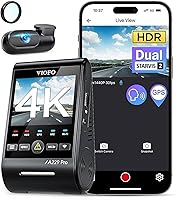
VIOFO A229 Plus vs Pro: Which Is Better? (October 2026)
For VIOFO A229 Plus vs Pro, choose the Plus for everyday front-and-rear coverage, or the Pro for higher-resolution front footage. The Pro adds 4K front recording and an included CPL filter; both record 1440P rear video.
On this page (10 sections)
- VIOFO A229 Plus vs Pro: which should you choose?
- Does 4K front video make the A229 Pro better?
- Which camera should night drivers choose?
- Do both models support parking mode?
- What shared features will you actually use?
- How should you plan the installation?
- What memory card and upkeep do these cameras need?
- Which mistakes should you avoid?
- Who should skip the Plus or the Pro?
- VIOFO A229 Plus vs Pro: the final decision
Choose the VIOFO A229 Plus for everyday front-and-rear coverage, or the A229 Pro if front-camera detail is your priority. The VIOFO A229 Plus vs Pro decision rests mainly on the Pro's higher front resolution and included reflection filter.
The Plus records 1440P from both cameras, while the Pro records 4K in front and 1440P behind. Buying the Pro upgrades the forward view without increasing rear resolution.
For most commuters, the Plus covers the core needs: recording both directions, reviewing clips and adding parked coverage with the right power connection. The Pro makes more sense when you specifically want extra front-image detail.
VIOFO A229 Plus vs Pro: which should you choose?
Choose the Plus unless you have a clear reason to want the Pro's front-camera upgrade. Choose the Pro if you expect to crop forward footage or want its included CPL filter for windshield reflections.


Matched resolution isn't a benefit by itself. The practical case for the Plus is that you get both directions covered without making a higher-resolution front camera part of your requirements.
Likewise, different front and rear resolutions aren't a drawback by themselves. The Pro suits someone who values the view ahead more than equal detail in both directions.
| Your main need | Better fit | Reason |
|---|---|---|
| Recording daily trips from both directions | A229 Plus | Its core coverage fits that job |
| More detail when cropping the forward view | A229 Pro | Higher front resolution gives you more pixels to work with |
| An included front reflection filter | A229 Pro | A CPL comes attached to the front lens |
| A rear-resolution upgrade over the Plus | Neither | The Pro doesn't increase rear resolution |
| Avoiding a rear-camera cable run | Neither | Both require a front-to-rear installation |
Neither is the right match if you only want a small front camera and the simplest possible wiring. Our front and rear dash cam guide explains when the second view earns its place.
Does 4K front video make the A229 Pro better?
The Pro gives you more front-image resolution, which is useful for inspecting smaller details or cropping footage. It doesn't guarantee readable plates in every recording.
A higher-resolution frame gives you more pixels around a distant sign, vehicle or road feature. That can help when you need to inspect one part of the scene instead of viewing the whole image.
Motion blur, distance, glare and lighting still affect what you can recover. A plate that occupies very little of the frame or is blurred by movement may remain unreadable after cropping.
Buy the Pro because you want that added room for inspection, especially in the forward view. Don't buy it on the assumption that every passing vehicle will leave a readable plate.
The Plus suits drivers whose main goal is documenting the sequence of an incident: lane position, traffic signals, vehicle movement and what happened behind them. Those details can matter even when a plate isn't clear.
If front resolution is your deciding factor, compare the Pro with the alternatives in our best 4K dash cams guide.
How do VIOFO A229 Plus vs Pro sensors and HDR compare?
Both models use Sony STARVIS 2 sensors and HDR on both channels. The Plus uses 2 IMX675 sensors, while the Pro pairs an IMX678 front sensor with an IMX675 rear sensor.
HDR helps balance bright and dark parts of a scene, such as headlights against an unlit street. It serves a different purpose from resolution, which describes the pixel dimensions of the recording.
The Plus offers front recording up to 60 fps, but that setting requires HDR to be off. Choose your settings around the light you drive in, rather than assuming the highest frame rate is always the best choice.
Which camera should night drivers choose?
Neither model earns a clear night-recording win from resolution alone. For night driving, pay attention to glare, exposure and your chosen recording settings as well as the camera model.
Street lighting varies widely between a city commute and an unlit rural road. Look at footage from conditions close to yours, including moving traffic, rather than judging only a bright, stationary scene.
On the Plus, decide whether HDR or the higher-frame-rate option better fits your route. More frames don't automatically produce clearer details when available light is limited.
The Pro's included CPL filter is a useful reason to choose it if dashboard reflections concern you. VIOFO says the filter reduces reflections and glare from glass and road surfaces.
A CPL doesn't remove every reflection, and it reduces some incoming light. Check its effect in daylight and after dark, following the filter instructions rather than assuming one adjustment suits every windshield.
Keep both windows clean inside and out. A rear camera looking through dirty glass can lose useful detail regardless of the front camera you choose.
If you're still deciding whether rear footage matters for your driving, read do you need a rear dash cam?.
Do both models support parking mode?
Both offer buffered auto event detection, time lapse and low bitrate parking recording. Their event mode saves 15 seconds before and 30 seconds after a detected event.
Choose the mode around what you need to preserve. Event recording focuses on detected activity, time lapse condenses a longer period, and low bitrate recording keeps a continuous record in smaller files.
Time lapse can show a sequence over time, but fewer frames leave wider gaps between moments. Continuous recording can provide more context, while also requiring you to manage the available storage.
Neither package includes the required hardwire cable. The Plus specifies the HK4, and the Pro specifies the HK4 ACC connection.
Parked recording also needs a suitable power plan. Don't assume a car charger provides it, because accessory sockets vary in whether they remain powered after the ignition is off.
Follow the hardwire kit's battery-protection instructions and consider how often you drive. Parking recording depends on available power, so a parked car isn't a promise of uninterrupted coverage for an unlimited period.
An installer is a sensible choice if you aren't comfortable identifying circuits and routing wires safely. Read what dash cam parking mode does before choosing settings, or compare alternatives in our dash cams with parking mode guide.
What shared features will you actually use?
Both provide GPS, 5GHz Wi-Fi and 12 voice commands, so convenience features are unlikely to decide this comparison. The more useful question is how you'll save and review footage when needed.
The GPS module supports GPS, BeiDou, Galileo and GLONASS. Playback in the VIOFO app or on a computer can show location, speed and time data.
Check the time settings during setup, and decide which information you want visible before sharing a clip. Keep the original file as well as any shortened or edited copy.
Wi-Fi connects each camera to the VIOFO app for previews, downloads and settings. Treat that as a local connection to the camera, rather than assuming it provides remote access from anywhere.
Voice commands include saving a photo, locking a video and controlling Wi-Fi. Learn the commands you expect to use while parked, so you're familiar with them before driving.
Both also provide notifications for settings changes and memory card issues. Act on a storage warning promptly, because an installed camera is only useful if it is saving usable footage.
How should you plan the installation?
Plan the rear cable route and camera positions before attaching either unit. Both packages include a 6 m rear cable, car charger, rear mount and trim removal tool.
Measure the route the cable will actually follow, including turns around trim and any hatch movement. A straight measurement from windshield to rear window can underestimate the length you need.
VIOFO offers longer 8 m and 10 m rear cables for the Pro. Confirm the correct cable for your model before ordering an extension or replacement.
Place the front camera where it has a clear view without blocking yours. Check local mounting rules, and aim for glass within the wipers' cleared area where practical.
At the rear, check how tint, defroster lines and window shape affect the image. Leave enough cable slack for a hatch to open without pulling on the camera connection.
Keep wiring away from airbag deployment paths, pedals and moving parts. Use our guide to hiding dash cam wires when planning the route, and get professional help if trim or airbag placement is unclear.
Before securing all the trim, preview both views and save a short recording. Our dash cam installation guide walks through the broader fitting process.
What memory card and upkeep do these cameras need?
Add a compatible high endurance microSD card and make footage checks part of your routine. Neither camera includes a card, both support up to 512 GB, and VIOFO recommends its industrial high endurance range.
Dash cams write repeatedly, so endurance matters alongside capacity. A card bought mainly for occasional photo storage isn't automatically the right choice for constant recording.
Capacity affects how much footage can remain before older files must be replaced. Recording settings, both camera channels and parking use all affect the actual history available.
Don't plan around an assumed number of recording hours without checking your settings and saved files. Our dash cam SD card guide explains how to choose storage for this use.
Format the card in the camera according to its instructions after saving anything you need. Before a long trip, open a recent front clip and rear clip to check that both are recording and the time is correct.
Clean the lenses gently and inspect the mounts after hot weather or any disturbance to the windshield. Recheck the camera angle if a mount shifts or the rear hatch cable catches.
Which mistakes should you avoid?
The biggest mistakes are expecting guaranteed plate capture, ignoring rear-camera placement and delaying a footage backup. A careful setup and a clear saving routine matter whichever model you buy.
Don't treat the Pro as an upgrade in every direction
The Pro's front upgrade doesn't give you a more detailed rear recording than the Plus. If your main concern is activity behind the car, focus on rear placement and a clear window before choosing based on the front specification.
A dirty rear window or a camera aimed too low can waste the value of either system. Check that the view includes useful road context rather than mostly your own vehicle.
Don't change settings while driving
Use the app, screen and menus while safely parked. Voice control can handle supported tasks on the road, but it shouldn't become another source of distraction.
For the Plus, remember that selecting the higher front frame rate means giving up HDR. Review the resulting footage in your normal driving conditions before settling on a setting.
Don't leave important clips only on the card
Save relevant front and rear clips as soon as it's safe, including the minutes around the incident. Keep an original copy somewhere separate from the camera.
The Pro can lock footage after detecting shaking or a collision, but you should still confirm that the needed files were saved. Don't assume an automatic event trigger captured every useful part of a minor incident.
Who should skip the Plus or the Pro?
Skip the Plus if 4K front recording is a firm requirement; skip the Pro if its front upgrade doesn't serve a clear need. Neither is the simplest fit for someone who wants only a front camera.
The Plus is a sensible choice for a daily commute, family trips and drivers who want evidence from both directions. Its appeal is the complete coverage plan, rather than equal resolution as an end in itself.
The Pro suits drivers who expect to inspect forward scenes closely or want the included CPL. It is less compelling if most of your concern is rear coverage or basic trip documentation.
Skip both if you aren't willing to route a rear cable or maintain a recording card. If parked coverage is essential, include the hardwire installation in your decision from the start.
Our VIOFO A229 Plus review looks at the Plus separately. For a broader choice between camera systems, see VIOFO vs Vantrue dash cams.
VIOFO A229 Plus vs Pro: the final decision
Buy the Plus for daily coverage from both directions; buy the Pro for the front-camera upgrade and included CPL. The Pro's lower overall score doesn't change its fit for a buyer who specifically needs those features.
Before ordering, settle 3 practical points: your rear cable route, your memory card and whether you need parked recording. Those choices turn either camera into a setup that fits your car and routine.
If the Pro meets your needs but you're considering another step up, read our VIOFO A229 Pro vs A329S comparison.
Frequently asked questions
What is the difference between the VIOFO A229 Plus and Pro?
The main difference is front resolution: the Plus records 1440P, while the Pro records 4K. Both record 1440P rear video and share front-and-rear HDR, GPS, app access and parking options, so the Pro's upgrade centers on the forward view and its included CPL filter.
Does the VIOFO A229 Plus record in 4K?
No, the A229 Plus records 1440P from both cameras. Its front camera can reach 60 fps with HDR off, so you must choose between that frame-rate setting and HDR; choose the A229 Pro if 4K front recording is a firm requirement.
Do the VIOFO A229 Plus and Pro need a hardwire cable for parking mode?
Yes, plan for the separate HK4 hardwire connection to use parking mode as specified for these cameras. Neither package includes that cable, so add it to your setup plan and follow its wiring and battery-protection instructions rather than assuming your car's accessory socket supplies suitable parked power.
Does either VIOFO A229 model include a memory card?
No, neither camera includes a microSD card. Both support capacities up to 512 GB, and VIOFO recommends its industrial high endurance cards; choose compatible storage, format it in the camera according to the instructions, and check saved clips regularly so a card problem doesn't go unnoticed.