VIOFO A229 Pro vs A329S: Which Is Better? (October 2026)
The VIOFO A329S vs A229 Pro choice comes down to your priorities: choose the A229 Pro for buffered parking clips, or the A329S for a 4K 60fps front option and external SSD storage. The A329S's front 60fps mode requires HDR to be off.
On this page (9 sections)
- VIOFO A329S vs A229 Pro: which differences matter?
- Which recording mode should you use?
- Which camera better suits your parking routine?
- Does the A329S's SSD option fit your routine?
- Which camera makes footage easier to retrieve?
- What should you check before installing either camera?
- How should you set up and care for the cameras?
- Which buying and use mistakes should you avoid?
- VIOFO A329S vs A229 Pro: make the final choice
For the VIOFO A329S vs A229 Pro choice, pick the A229 Pro for context before a parking event or the A329S for more storage options and a higher front frame rate. Your parking habits and footage-saving routine should decide which features deserve priority.
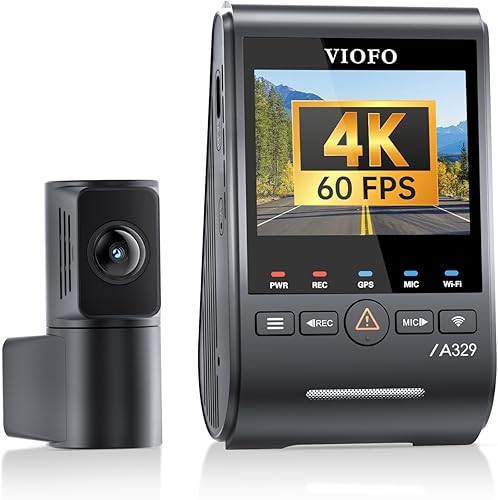
Both record 4K front and 2K rear video, so this isn't a choice between single-camera and dual-camera coverage. The useful differences are how they record, what happens while parked and how you store or retrieve clips.

VIOFO A329S vs A229 Pro: which differences matter?
The A229 Pro favors buffered parking coverage, while the A329S favors recording and storage flexibility. Start with the feature you'll use weekly rather than the longest feature list.
Both use an IMX678 front sensor and IMX675 rear sensor, with HDR available on both channels. That shared hardware gives neither camera an automatic win for every road or lighting condition.
The A229 Pro records front video at 30fps. The A329S offers a 60fps front mode, but HDR must be off to use it; its rear camera records at 30fps.
Storage is the other major split: both accept microSD cards up to 512GB, while the A329S also supports an external SSD up to 4TB. Neither includes recording storage.
Use these differences to narrow the choice:
- Daily commute and street parking: favor the A229 Pro if seeing the lead-up to a detected event matters most.
- Long drives and keeping more footage: favor the A329S if you'll use its external drive option.
- Frequent clip downloads: give the A329S extra weight for Wi-Fi 6.
- Basic front and rear coverage: decide how much the extra functions matter before choosing either.
Skip the A229 Pro if external drive recording is a requirement. Skip the A329S if its added features would stay unused and buffered parking clips are your main reason for buying.
Which recording mode should you use?
Choose HDR for difficult light or the A329S's higher frame-rate mode for smoother motion. More frames and more balanced exposure solve different problems.
HDR helps handle bright and dark parts of a scene, such as a shaded road beneath a bright sky. VIOFO says its HDR processing helps preserve details, but readable plates still depend on speed, distance, angle and light.
A higher frame rate gives you more moments to examine during playback. It doesn't guarantee sharper moving plates because exposure time, glare and the distance between vehicles still affect each frame.
How should you choose A329S vs A229 Pro video settings?
Choose around your usual driving conditions, then review actual saved clips before settling on a mode. A nighttime commuter has different needs from someone who mostly drives on bright, open roads.
For the A329S, make the HDR-versus-frame-rate choice deliberately. Don't select the highest number once and assume it suits every trip.
Review a short daytime clip and a nighttime clip while safely parked afterward. Look at signs, nearby vehicles, dashboard reflections and transitions between shaded and bright areas.
Watch the rear footage too. A clear front view won't compensate for a rear camera aimed mostly at the headliner or blocked by trim.
If you're still comparing resolution-focused options, see our best 4K dash cams. Our best front and rear dash cams guide helps if the two-camera layout is your main requirement.
Which camera better suits your parking routine?
Choose the A229 Pro for footage before detection and consider the A329S for power-saving impact detection. Decide whether you need the approach to an event or recording triggered by an impact.
The A229 Pro offers Auto Event Detection, Low Bitrate and Time Lapse parking modes. Its buffered event recording saves 15 seconds before and 30 seconds after a detected event.
That lead-up can help explain how a moving object reached your vehicle. It is especially useful if a clip beginning at the moment of contact would leave out the context you want.
Low bitrate recording suits reviewing activity over a period without relying only on an event trigger. Time-lapse recording favors a broad view of activity, though fewer captured moments can leave less detail about a brief incident.
The A329S has a power-saving parking mode that starts recording when it detects a collision. VIOFO describes it as an ultra-low-power approach, which suits buyers who prioritize reduced parked power use.
Neither approach promises a complete record of every incident. Camera direction, obstructions, detection behavior and available power all affect what gets saved.
The A229 Pro uses an HK4 hardwire kit for its parking setup; the A329S supports HK4 or HK6 kits. Hardwire kits are separate, so include installation in your buying plan.
If your car sits unused for long periods, account for battery condition and driving frequency. Our guide to whether a dash cam drains a car battery explains why power planning matters even with a power-saving mode.
Does the A329S's SSD option fit your routine?
Choose an external SSD only if you need a larger rolling archive and have a secure place for the drive. A microSD card keeps the installation simpler on either camera.
More storage means older footage can remain available longer before being overwritten. Exact retention depends on recording settings, hours driven, parking use and the space used by protected files.
Don't turn maximum capacity into a promised number of days. A vehicle recording during long shifts and while parked has different storage needs from one used for short errands.
The A329S's drive option makes sense if you often discover that you need footage several days after a trip. It also suits drivers willing to manage another cable and a separate device inside the car.
VIOFO recommends its optional Type-C SSD cable. Secure the drive where it cannot slide into pedals, pull on a connector or become a loose object during sudden braking.
For most everyday use, start by choosing a compatible high-endurance card rather than adding hardware you don't need. VIOFO recommends its industrial high-endurance microSD cards for the A229 Pro.
Our guide to what SD card a dash cam needs explains endurance and capacity choices. Use the camera's storage setup instructions, then confirm that it can save and play back a clip before relying on it.
Which camera makes footage easier to retrieve?
The A329S suits frequent phone transfers, while the A229 Pro provides app access for settings, previews and downloads. Consider how often you'll retrieve footage rather than choosing by wireless speed alone.
The A229 Pro uses 5GHz Wi-Fi. The A329S uses Wi-Fi 6 in the 5GHz band, with VIOFO claiming transfer speeds up to 30MB/s.
Actual transfer time depends on your phone and connection. That makes the A329S's wireless feature most useful to someone who downloads clips often, especially several files from the same trip.
Both cameras provide GPS location, speed and time information during supported playback. Check the time zone and timestamp during setup so the saved record matches your local time.
Practice finding a clip while parked before an incident makes it urgent. Our guide to viewing dash cam footage on your phone covers the general process.
After an incident, save the relevant front and rear files, including nearby clips that show the lead-up and aftermath. Keep the originals and a second copy before trimming a version for sharing.
Don't rely on wireless access as your only saving routine. Know how to retrieve files from your chosen storage, and stop the vehicle safely before handling the camera or card.
What should you check before installing either camera?
Check camera placement, cable length and power before attaching the mounts. Both kits require a rear cable route, so careful planning matters more than a quick front-camera fit.
Both include a front CPL filter, a car charger and a 6 m rear cable. VIOFO also offers longer 8 m and 10 m rear cables for vehicles that need them.
Measure along the intended route around the cabin, including bends and the path to a moving hatch. Leave enough slack for normal hatch movement without creating a loop that catches on trim.
The A329S uses a slim 2.8 mm coaxial rear cable with miniature connectors. VIOFO says this cable is less susceptible to electromagnetic and radio-frequency interference, and its narrow profile may help with routing through tight spaces.
Before sticking down either mount:
- Check the front view: keep the camera clear of obstructions and outside your normal sightline.
- Check the rear view: avoid trim, stickers and areas where dirt commonly blocks the glass.
- Confirm cable reach: allow for corners and moving panels before hiding the wire.
- Plan the power connection: distinguish normal driving power from your parking setup.
Keep wires away from airbag deployment paths and moving controls. Don't force a cable behind unfamiliar pillar trim; use a qualified installer if the route requires work around airbags or vehicle wiring.
Read how to install a dash cam for the mounting sequence. For parking power, our guide to hardwiring a dash cam explains the general installation choices.
How should you set up and care for the cameras?
Complete a record-and-playback check before tidying every cable, then make lens and storage checks part of your routine. A camera that appears powered on still needs to produce usable saved files.
Clean the mounting areas before applying adhesive and follow the mount instructions. Set the view with enough road visible ahead and behind, rather than filling the frame with sky or your dashboard.
The included CPL filters reduce reflections, but they don't replace clean glass. Check the recorded view for dashboard glare and keep both the lens surface and nearby windshield area free of smears.
Confirm that recording resumes after an ordinary power cycle. Also check your audio preference, timestamp and parking settings so the camera behaves as you expect each day.
Both models offer voice controls and notifications about settings or memory card issues. Learn the commands you need while parked, and respond to card warnings instead of dismissing them.
On the A229 Pro, automatic collision locking helps protect important files from normal loop overwriting. Still copy incident footage promptly rather than treating protected storage as a permanent archive.
Review a recent front and rear clip after storage changes, camera adjustments or work near the mounts. Periodic checks can reveal a shifted camera, dirty window or storage problem before you need the footage.
Which buying and use mistakes should you avoid?
Avoid buying around one headline feature without planning the installation and saving routine. The right camera is the one whose useful functions you'll actually set up and maintain.
Don't assume a higher frame rate guarantees readable plates. Both vehicles may be moving, headlights can cause glare and the subject may occupy too few pixels in the frame.
Don't confuse parking support with included parking power. Order the compatible kit and plan the wiring if parked recording is part of your reason for buying.
Don't assume a rear camera covers every direction. These systems add a view behind the car, but front and rear views can still leave activity beside the vehicle outside the frame.
If that coverage question is unresolved, read whether you need a rear dash cam. Decide what you want to document before committing to the cable work.
Don't keep driving for days before saving an important clip. Rolling storage eventually replaces older footage, and more capacity only extends the window for retrieval.
Don't hide every wire before reviewing both views. Finish the permanent fit after confirming that the camera angles, power connection and saved files meet your needs.
VIOFO A329S vs A229 Pro: make the final choice
Pick the A229 Pro if parking-event context is your deciding need. It suits a driver who wants footage leading up to detection and will arrange the power setup needed to use that feature.
Pick the A329S if you have a clear use for its extra recording, transfer or storage options. It suits frequent footage downloads and longer recording archives, provided you're willing to manage the chosen setup.
For the VIOFO A329S vs A229 Pro decision, name your must-have feature before ordering. Then add compatible storage, any parking-power hardware and installation time to the plan.
If neither camera's main advantage matches your needs, compare the VIOFO A229 Plus vs Pro before committing to features you may rarely use.
Frequently asked questions
Is the VIOFO A329S better than the A229 Pro?
The A329S is the better fit for external SSD storage, Wi-Fi 6 and a higher front frame-rate option. Choose the A229 Pro when buffered parking clips matter more, since its event mode saves footage before detection as well as afterward, adding context to a parked-car incident.
Does the A329S record 4K at 60fps with HDR?
No, the A329S cannot record front video at 4K 60fps while HDR is enabled. Choose the higher frame rate for smoother motion, or use HDR to help balance bright and dark areas, then review saved clips from the driving conditions that matter to you.
Do both VIOFO cameras include a rear camera?
Yes, both packages include front and rear cameras, with a 6 m rear cable. Measure the actual route around trim and through any hatch connection before mounting either camera, since a straight measurement through the cabin can leave you short of cable at the rear window.
Can either dash cam record while the car is parked?
Yes, both support parking recording with a compatible hardwire setup, but their approaches differ. The A229 Pro offers buffered event detection, low bitrate and time-lapse recording, while the A329S offers a power-saving impact detection mode; neither package includes the hardwire kit needed for that setup.
What storage can the VIOFO A329S use?
The A329S accepts microSD cards up to 512GB or an external SSD up to 4TB, with neither included. VIOFO recommends its optional Type-C SSD cable for an external drive, so include the cable and a secure mounting location in your plan before choosing SSD recording.